Novel Writing Software: The Complete 2026 Guide
Every major category of writing tool, what each does well, and how to choose.
What matters most in writing software
Before comparing specific tools, it helps to know what to evaluate. These are the capabilities that matter most for long-form fiction, ranked roughly by impact on your daily writing experience.
- Manuscript organization
- A novel isn't a single document. It's a structure — parts, chapters, scenes, front matter, back matter. Your writing tool should let you work with that structure directly. The gold standard is scene-level organization: the ability to break chapters into individual scenes and rearrange them freely. This is how professional editors think about manuscripts, and it's the level of granularity where structural problems become visible.
- The writing experience
- You'll spend hundreds of hours in your editor. It should be comfortable. That means clean typography, distraction-free mode when you want it, fast performance even at 100,000 words, and reliable autosave. Details matter here — font rendering, cursor behavior, paragraph spacing. A tool that fights you on the basics will drain your energy before you get to the creative work.
- Export and formatting
- Can the tool produce files you can actually publish? For self-publishing authors, this means EPUB for ebook platforms and print-ready PDF for paperback. Many writing tools export only to DOCX, which means you need a second tool (Vellum, Atticus, or manual formatting in Word) to go from manuscript to published book. Tools that handle the entire pipeline — writing through publish-ready output — save significant time and cost.
- Character and world management
- Novels have casts. Keeping track of character descriptions, relationships, locations, and research notes alongside your manuscript — rather than in a separate app — reduces context-switching and helps you maintain consistency across a long project.
- Cross-platform support
- Does the tool run on your operating system? Can you move between devices? Some tools are Mac-only. Some are Windows-only. Some are browser-based and work everywhere but require an internet connection. Know your constraints before you commit.
- Data ownership
- Where do your manuscripts live? On your hard drive, or on someone else's server? Cloud-based tools offer convenience but create dependency. If the company shuts down or changes terms, what happens to your work? Local-first tools give you full control over your files; some pair that with encrypted cloud sync, while others leave syncing to you. This is a genuine trade-off with no universally right answer.
- Active development
- Is the tool still being improved? Software that hasn't shipped a meaningful update in two years is software that's being maintained, not developed. In a space that's evolving as quickly as writing tools, stagnation is a risk factor.
Full writing environments
Novel writing software falls into five broad categories. Most tools fit cleanly into one; a few span two. These are the tools designed to be your primary workspace — where you draft, organize, revise, and (in some cases) format your entire manuscript.
Scrivener
Scrivener ($59.99 each on macOS and Windows, $23.99 on iOS) remains the most established name in the category. It pioneered the binder-based, scene-level approach to manuscript organization that most modern tools have adopted in some form. Its Corkboard and Outliner views, snapshot system, and deep customization options give experienced users extraordinary control. As a one-time purchase, it's also one of the more affordable options over the long run.
Scrivener's weaknesses are well-known at this point. The interface hasn't been modernized in years. The Compile system — which handles export — is powerful but has a reputation for being hard to configure, and most authors end up exporting to Word and formatting elsewhere. There's no AI capability, no built-in cloud sync (syncing via Dropbox is possible but error-prone), and the iOS version lags behind the desktop versions. Scrivener is a great tool with a distinctly older-generation interface.
Bookshaper
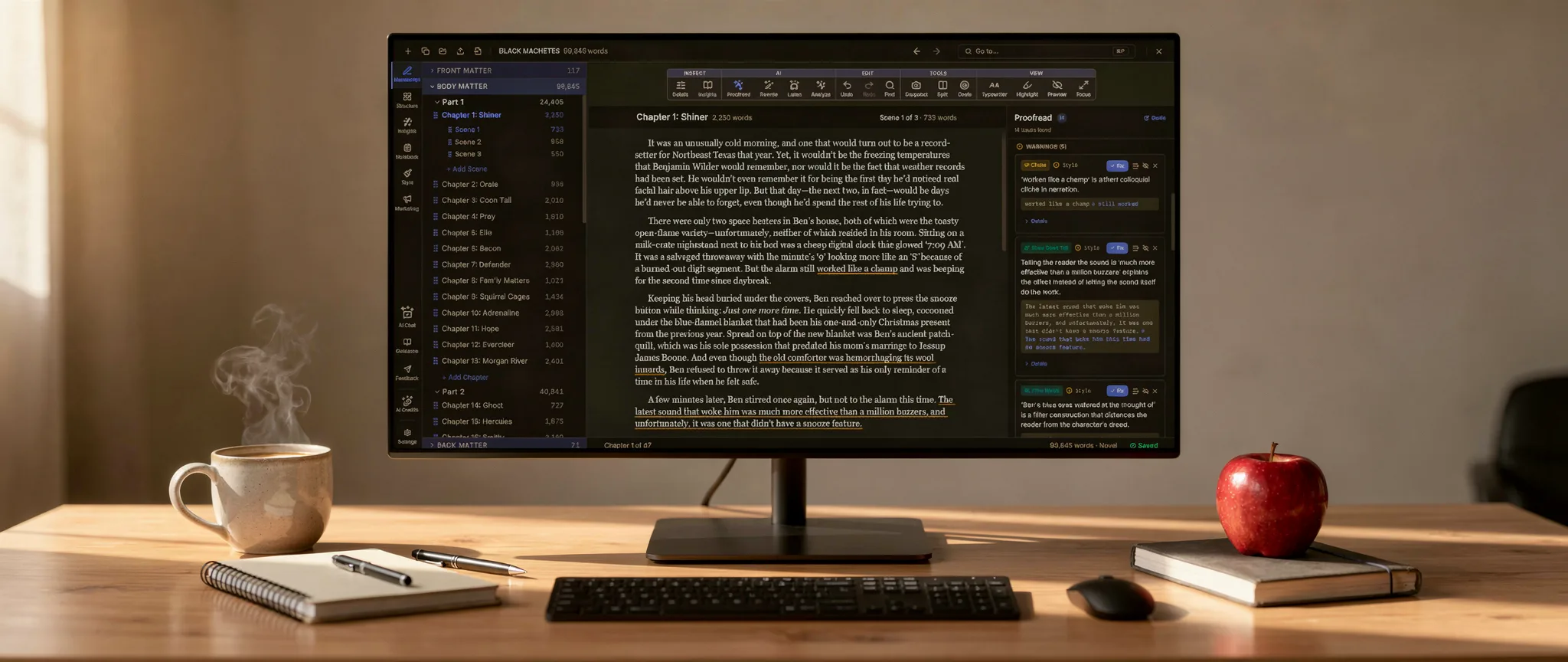
Bookshaper (from $9.99/month, macOS/Windows/Linux) is a desktop writing environment that combines scene-based writing, manuscript organization, AI-powered narrative analysis, grammar and style checking, professional formatting, and a full suite of going-to-market tools in a single application. It organizes manuscripts into parts, chapters, and scenes with drag-and-drop reordering, a card view for visual scene management, top-down Outline and bottom-up Beat Cards planning, and a manuscript preview pane.
Where Bookshaper diverges most from Scrivener is in structural analysis, formatting, and the work that comes after the draft. The AI analysis engine (available in the Pro tier at $14.99/month) reads your manuscript and surfaces insights about pacing, character arcs, themes, emotional cadence, and continuity — the kind of feedback you'd normally get from a developmental editor — alongside a multi-level synopsis ladder, an AI-extracted Story Bible, Lume (an in-app assistant that answers questions out of your own text), and optional voice-calibrated refinement tools. The formatting pipeline pairs 60 genre/era templates with a formatting editor of 41 typographic targets and exports straight to publish-ready EPUB, print-ready PDF, and DOCX. And Bookshaper designs your cover and drafts the going-to-market assets — back-cover blurbs, KDP storefront metadata, web-verified comp titles, and a query-letter kit — from that same analysis, so the whole pipeline from draft to storefront stays in one app. No second tool needed.
The trade-off: Bookshaper is a subscription rather than a one-time purchase, and there's no mobile or browser version. It's local-first — manuscripts live on your computer as plain files and are also synced to the cloud, encrypted on your device before upload — which is strong for data ownership and cross-device access but won't suit authors who want to write in a browser or on a phone.
Dabble
Dabble (from $19/month, browser-based) emphasizes a clean interface, goal tracking, and cloud sync across all devices. It supports chapters and scenes, drag-and-drop reordering, word count goals with visual progress tracking, and sticky notes for story planning. Its higher tiers add grammar and style checking. Cloud sync is genuine and reliable — you can switch between your laptop, tablet, and phone seamlessly.
Dabble's main limitation is that it doesn't produce publish-ready output. It exports to DOCX but not to EPUB or formatted PDF, so you'll need a separate formatting tool. There's no AI structural analysis, no character presence tracking, and no typographic control. At $19 to $49/month across its three tiers, Dabble sits toward the higher end of the category.
NovelPad
NovelPad ($15/month, browser and desktop) is designed specifically for fiction writers. It supports scene-based organization, character notes, and integrated grammar checking via ProWritingAid. There's also a drag-and-drop board view of scene cards, and the interface is purpose-built for novels.
NovelPad does export a publish-ready EPUB (cover included), but not a print-ready PDF, and it has no AI structural analysis, no typographic/formatting engine, and no visual dashboards.
Ulysses
Ulysses ($49.99/year, macOS/iPad/iPhone) is a minimalist, Markdown-based writing app with tight Apple ecosystem integration. iCloud sync across all Apple devices is seamless, and the writing interface is one of the cleanest available. At under $50/year, it's one of the most affordable subscription options.
Ulysses is Apple-only — no Windows, no Linux, no browser version. Its organizational model uses flat text sheets rather than a structured parts/chapters/scenes hierarchy, which can feel limiting for complex novels. There's no AI analysis and no character tracking, and while it exports styled EPUB, PDF, and DOCX, it lacks the granular book-design control of a dedicated formatter.
Ready to try the one-tool pipeline?
Bookshaper lets you write, analyze, format, and publish in one app — no exporting to a second tool.
Formatting-first tools
These tools exist to solve one problem: turning your finished manuscript into a professionally formatted book.
Vellum ($199.99–$249.99, Mac only) is the industry standard for book formatting. Its templates are beautiful, the interface is intuitive, and the output quality is exceptional. You import a Word document, choose a style, and export to every ebook platform and print format you need. Vellum is purely a formatting tool — you can't write or organize your manuscript in it. And it's Mac-only with no Windows, Linux, or browser version.
Atticus ($147 one-time, browser-based) is the most direct Vellum competitor. It runs in the browser (any platform), offers template-based formatting for both ebook and print, and includes a writing editor that supports chapters and scenes. The one-time pricing with lifetime updates is appealing. Formatting options are solid but less refined than Vellum's, and the writing environment is minimal — no card view, no character tracking, no structural analysis.
Free options
Budget constraints shouldn't prevent you from writing. These tools cost nothing and can get real work done.
yWriter (free, Windows) is a donation-supported tool developed by Simon Haynes, a published author. It supports scene-based organization with character and location tracking, word count goals, and multiple organizational views. The interface shows its age, and the free app is Windows-first (third-party paid Mac, iOS, and Android ports exist, and it runs on Linux via Wine), but it's feature-complete for basic novel organization at zero cost.
Reedsy Book Editor (free, browser-based) is a clean, simple writing and formatting tool. It produces surprisingly professional ebook and print output for a free tool. Formatting options are limited — you can't customize typography in detail — but for authors who want a no-cost path to a formatted book, it's hard to beat.
Google Docs (free, browser-based) isn't a writing tool, but many authors use it as one. It works for drafting and collaboration, but it has no manuscript organization, no scene management, no formatting engine for book output, and no structural tools. For short projects or early brainstorming, it works. For a full novel, you'll outgrow it quickly.
Master comparison table
| Tool | Category | Scenes | Formatting | AI | Platforms | Pricing |
|---|---|---|---|---|---|---|
| Scrivener | Full environment | Yes | Export only | No | Mac, Win, iOS | $59.99 one-time |
| Bookshaper | Full environment | Yes | EPUB/PDF/DOCX | Analysis (Pro) | Mac, Win, Linux | From $9.99/mo |
| Dabble | Full environment | Yes | DOCX only | No | Browser | From $19/mo |
| NovelPad | Full environment | Yes | EPUB + DOCX | No | Browser | $15/mo |
| Ulysses | Full environment | No | Limited | No | Apple only | $49.99/yr |
| Vellum | Formatting | No | EPUB + PDF | No | Mac only | $199–$250 |
| Atticus | Formatting | No | EPUB + PDF | No | Browser | $147 one-time |
| Sudowrite | AI writing | No | No | Generation | Browser, iOS, Android | From $19/mo |
| Novelcrafter | AI writing | Partial | No | Generation | Browser | $8/mo for AI |
| yWriter | Free | Yes | No | No | Windows | Free |
| Reedsy | Free | Partial | EPUB + PDF | No | Browser | Free |
| Plottr | Planning | No | No | No | Desktop, browser | From $10/mo |
| Campfire | Planning | No | No | No | Browser, desktop | From $12/mo |
A note on data ownership
One factor that deserves special attention is where your manuscripts live. Browser-based tools store your work on their servers. If the service shuts down, changes its pricing dramatically, or suffers a data loss, your access to your own writing could be affected.
Local-first tools — Scrivener, Bookshaper, yWriter — store your manuscripts as files on your computer. You own those files. You can back them up however you want, and they'll exist as long as your hard drive does, regardless of what happens to the software company.
This isn't an argument against cloud-based tools — the convenience of sync and anywhere-access is real. But it's a factor worth considering, especially for a novel you'll spend months or years writing. Whatever tool you choose, make sure you have a backup strategy that doesn't depend entirely on the tool's continued existence.